
[Vampir Tips] Automate your daily tasks by utilizing 'Support Mode'!
[뱀피르 꿀팁] '서포트 모드' 활용으로 숙제 자동 완료!

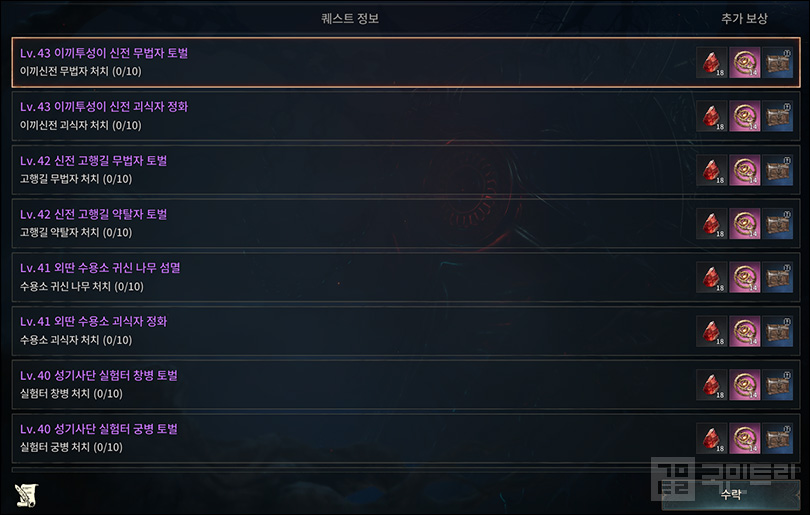
In Vampir, consistency is the real key to character growth. While the long-term strategy of idling in a field might seem tempting, you absolutely must finish your daily 'chores' first. They offer far better returns on experience and currency for the time invested, not to mention the exclusive rewards you simply cannot get anywhere else.
However, these chores demand a bit more attention than mindless grinding. You have to hop between locations, stock up on potions, and sort through your loot. It’s a chore in every sense of the word. Thankfully, the 'Support Mode' system exists to streamline this repetitive routine. Let’s break down how to get the most out of it.
Mastering the 'Support Mode' Sequence
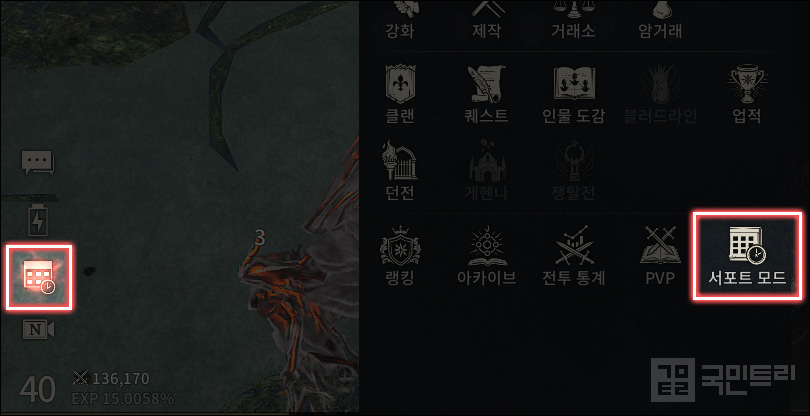
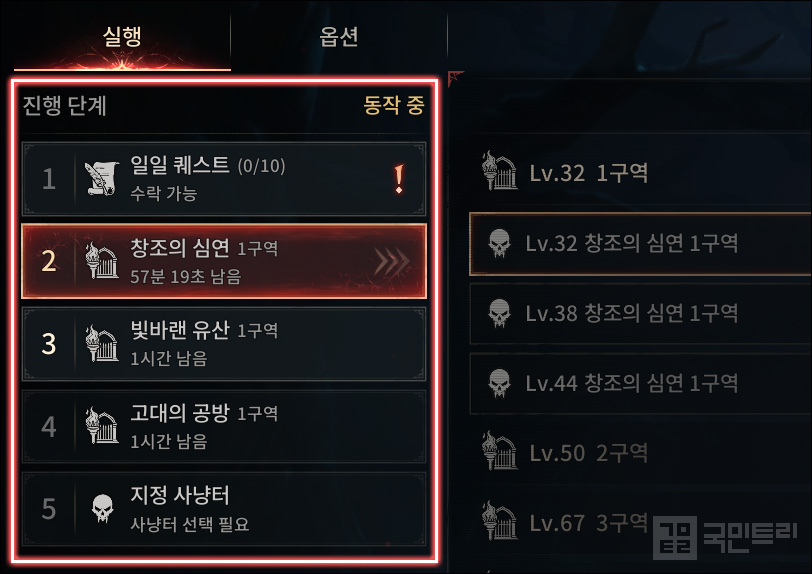
You can access Vampir's Support Mode via the calendar-shaped button sitting just above the camera toggle in the bottom left of the main screen. Alternatively, just tap the Support Mode option in the menu. Upon your first visit, you will see the default 'progression steps'—usually Daily Quests, followed by three dungeons, and then field grinding. You are free to reorder these as you see fit. By default, the system will automatically transport you to the next location as soon as a quest is accepted.
While the system’s recommended path is decent, smart players will adjust it. For example, if finishing dungeons pushes you to a new level that increases your Daily Quest rewards, it pays to prioritize the dungeons first. Conversely, if a quest level-up unlocks a new area, sticking to the default path is usually the wiser choice.
For the 'Ancient Workshop,' which has a strict weekly time limit, I strongly suggest using your best buff items before diving in to maximize efficiency. If you leave it on default and let that precious time tick away without proper preparation, your growth will inevitably suffer.
The Secret to Seamless Support: 'Auto-Maintenance'
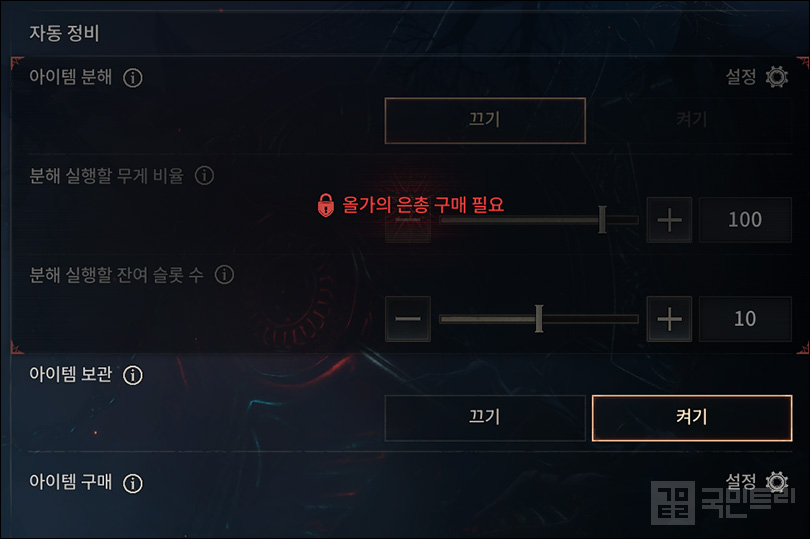
What happens when your bags are full, your weight limit is hit, or you run out of potions while in Support Mode? If you haven't planned ahead, your progress will hit a wall. Manually managing these every single time is a nightmare, which is why the Auto-Maintenance feature is such a lifesaver.
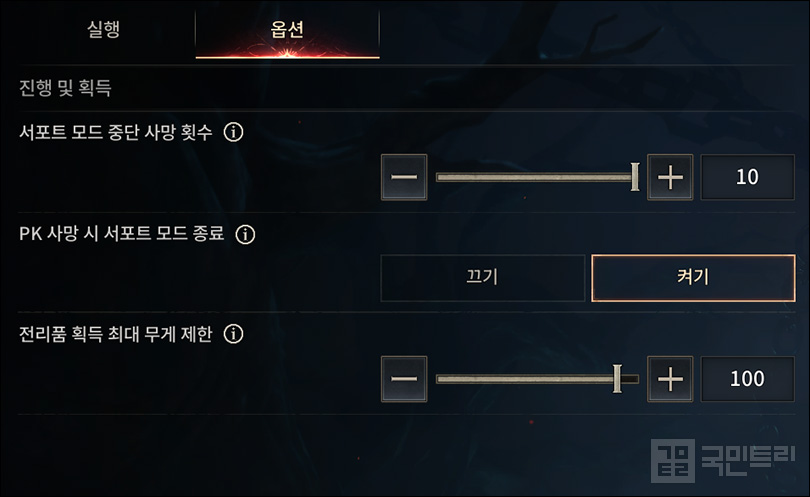
By default, the mode halts if your character dies. If you prefer to keep going, you can tweak the 'Support Mode Death Limit' to allow up to 10 deaths before it gives up. You can also set it to exit immediately if you are killed in PK, saving you from becoming a perpetual punching bag for other players.
The locked 'Auto-Maintenance' section on the right unlocks once you purchase the 'Olga's Grace' monthly subscription. Here, you can set the game to automatically dismantle unnecessary gear. When paired with the item storage feature, you can leave the game running for long stretches without a hitch. You can even dictate the exact gear grades to dismantle. If you want to keep your bags lean without sacrificing too much loot, just set the weight and slot thresholds to their maximum capacity.
If you do decide to grab Olga's Grace, don't ignore the other perks: offline mode duration, extra daily quests, and the private trading feature. I recommend using the 990 Mileage points included in the bundle to buy entry tickets for the 'Village of Despair' epic dungeon, as it is currently one of the hottest spots to farm Trinity.
Wrapping Up: Making the Most of 'Offline Mode'
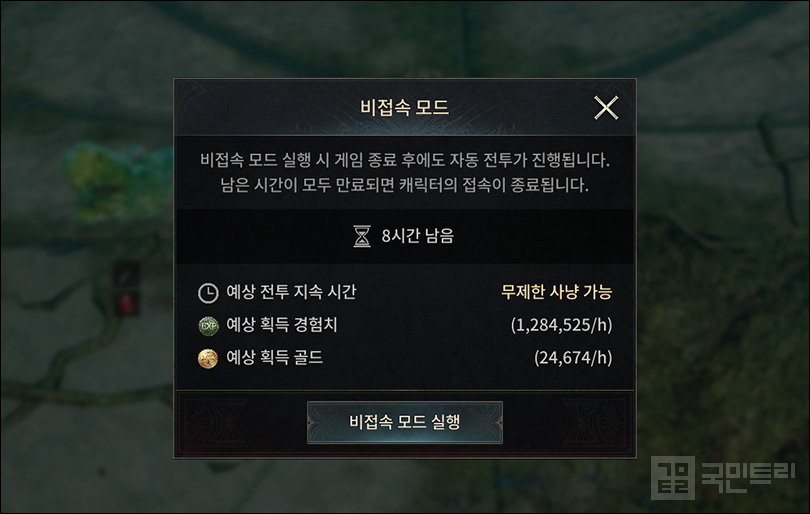
Once your daily chores are done, you can lean on 'Offline Mode' for long-term grinding. Unlike Support Mode, this keeps the action going while the app is closed. You get 8 hours by default, with an extra 2 hours if you have Olga's Grace active. Check the expected XP and gold gains before you start, and pick your spot accordingly.
Admittedly, the efficiency is a bit lower than keeping the screen active, and the final results often deviate from the estimates. Still, the freedom to shut down your phone or PC while you sleep or work is a massive benefit. If you want to accumulate wealth efficiently, I highly recommend using it.
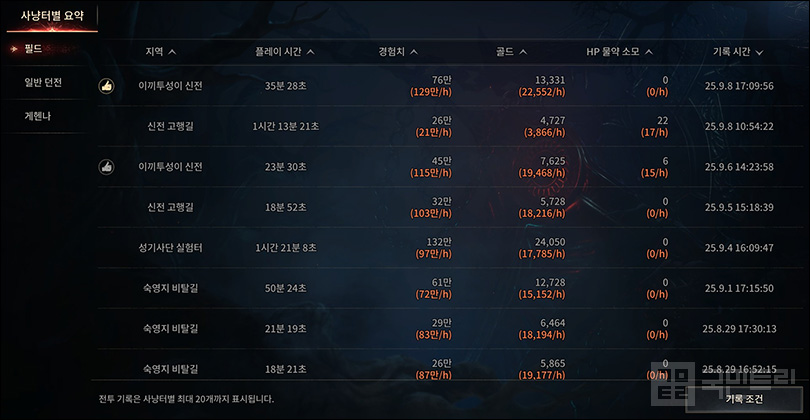
Finding the most efficient spots for Offline Mode is on you, though. Check the 'Combat Stats' in the menu to see the performance of every area you have visited. It gives you a clear picture of which fields offer the best XP and gold, and even logs your potion consumption—ensuring your character stays alive while you are away.
'뱀피르' 캐릭터 성장에서 가장 중요한 것은 꾸준함이다. 캐릭터를 매일 일반 필드에 방치하듯 사냥하는 장기적인 방법은 물론 좋지만, 그전에 이른바 '숙제'라고 부르는 것들을 매일 차근차근 마무리 짓는 것이 중요하다. 들어가는 시간 대비 벌어들이는 재화, 경험치 효율이 뛰어난 점이 있고, 특정 콘텐츠 한정으로만 얻을 수 있는 재화도 있기 때문이다.
숙제를 모두 끝내려면 아무래도 단순 필드 사냥보다는 손이 더 많이간다. 장소를 계속 옮겨야 하며, 중간 중간 포션 구매부터 전리품을 정리하는 과정까지 제법 신경써야할 포인트가 많다. 이렇게 매일 반복하는 루틴을 보다 쉽게 이용할 수 있도록 돕는 시스템이 바로 서포트 모드다. 관련 내용을 본문을 통해 차근차근 살펴보자.
순서 설정이 중요한 '서포트 모드'
뱀피르의 서포트 모드는 게임 메인 화면의 좌측 하단, 카메라 시점 변경 버튼 위 달력 모양 버튼으로 진입할 수 있다. 또는 메뉴 하단의 서포트 모드를 눌러도 된다. 처음 버튼을 누르면 기본 값으로 설정된 '진행 단계'가 나온다. '일일 퀘스트 - 일반 던전 3종 - 사냥터' 순으로 향하게끔 정해져 있다. 순서는 여기 설정 창에서 자유롭게 바꿀 수 있다. 기본 설정은 일일 퀘스트 수락이 끝나면 즉시 해당 장소로 이동하는 동선이다.
시스템에서 추천하는 순서도 좋지만 조정을 권하는 케이스도 있다. 일반 던전을 모두 돌고 나서 레벨이 오르면 일일 퀘스트 보상이 한 단계 오르는 경우가 대표적이다. 이럴 땐 던전 우선순위를 올려서 레벨을 먼저 올리고, 일일 퀘스트를 수락 후 진행하는 것이 이득이다. 반대로 일일 퀘스트로 레벨이 오르면 던전 다음 구역 진입이 가능한 경우도 있다. 이때는 기본값으로 정해진 순서를 따라가는 것이 좋다.
주간 이용 시간제한이 있는 '고대의 공방'은 시간이 한정되어 있으니 도핑 아이템을 모두 세팅해서 사냥 효율을 높인 뒤 이용하는 것을 추천한다. 이를 신경 쓰지 않고 기본 설정 상태로 고대의 공방 시간이 모두 허비되면 그만큼 성장이 더뎌질 수밖에 없다.
원활한 서포트 모드의 핵심 '자동 정비' 기능 설정
편하게 서포트 모드를 이용하던 중 가방 슬롯, 무게가 가득 차거나 포션이 부족하면 어떨까? 미리 관리를 해두지 않았다면 큰 변수가 될 것이다. 그렇다고 매번 서포트 모드를 이용할 때마다 포션을 채우고, 가방 정리를 하는 건 굉장히 번거롭다. 그래서 서포트 모드는 이러한 자동 정비 기능을 옵션에 포함했다.
기본적으로 서포트 모드 중 캐릭터가 사망하면 기능이 멈춘다. 그럼에도 다시 이동해서 콘텐츠를 이용하도록 싶다면 '서포트 모드 중단 사망 횟수'를 세팅해두자. 최대 10회 사망 설정이 가능해 콘텐츠 이용이 불가능한 정도의 사냥터만 중단되도록 정할 수 있다. 아울러 PK 사망 시 서포트 모드를 종료하게끔 설정하면 상대에게 계속 목숨을 잃는 상황을 단 한 번으로 끝낼 수 있다.
우측에 잠겨 있는 자동 정비 영역은 월정액 상품인 '올가의 은총' 구매 시 열린다. 여기서는 서포트 모드 중 획득 아이템 중 필요 없는 것을 자동으로 분해하도록 설정 가능하다. 아래에 있는 아이템 보관 기능과 연계되면 서포트 모드 장시간 이용에 불편함이 사라진다. 설정에서 분해할 장비 종류나 등급을 세세하게 정할 수 있다. 서포트 모드가 풀리지 않게 분해를 하되, 아이템을 최대한 확보하고 싶다면 '분해 실행할 무게 비율·잔여 슬롯 수'를 가능한 최대치로 정하면 된다.
참고로 올가의 은총 구매를 마음먹었다면 함께 제공하는 혜택을 놓치지 말자. 비접속 모드 시간과 일일 퀘스트 가능 개수 추가, 개인 거래 기능 등이 열린다. 함께 제공하는 990 마일리지는 상점에 들어가 주간 제한이 있는 '절망의 마을' 에픽 던전 입장권 구매를 추천한다. 최근 핫한 트리니티 수급처로 손꼽히는 곳이다.
서포트 모드를 모두 끝냈다면 '비접속 모드'를 알뜰히 이용
일일 숙제 관리에 서포트 모드가 있다면, 매일 방치해둘 장시간 사냥은 비접속 모드로 대체 가능하다. 서포트 모드와는 다르게 게임을 켜두지 않아도 자동 전투를 수행하는 오프라인 전용 시스템이다. 매일 기본 8시간 이용 가능하며, 앞서 소개한 올가의 은총 적용 시 2시간을 추가로 누릴 수 있다. 비접속 모드 실행 전 예상 획득 경험치와 골드를 보고 원하는 사냥터를 이용하면 된다.
아쉬운 점은 실제로 켜두는 사냥 방식보다는 효율이 약간 떨어지는 점이다. 비접속 모드가 끝나면 시간과 획득 재화, 아이템 등을 정리해서 보여주는데, 실행 전 예상 획득 수치와 차이가 제법 난다. 이런 점을 감안하더라도 바쁜 업무를 볼 때나 수면 시간에 모바일 기기, 컴퓨터를 꺼둘 수 있는 것이 메리트다. 모든 시간 알뜰히 재화를 쌓고 싶다면 이용을 적극 권한다.
대신 비접속 모드 사냥 효율이 좋은 사냥터는 직접 알아봐야 한다. 메뉴의 '전투 통계'에 들어가면 지금껏 사냥했던 곳의 경험치와 골드가 정리되어 있다. 어떤 필드의 경험치가 나에게 가장 효율이 가장 좋은지 직관적으로 알 수 있으며, HP 물약 소모 개수도 기록해 제공한다. 단순 사냥 효율 확인으로 끝나는 게 아니라 사냥 안정성 확보도 가능하다는 의미다.






- [Today's steam] Animorphs officially released, recording 100,000 Concurrent Players
- An Ensemble Drama with Four Heroes, Fire Emblem Mazachanhong
- [Today's steam] PC version of The War of Genesis Raising achieves 30,000 Concurrent Players
- What is the recently popular indie game genre 'DB Thriller'?
- [TGS 26] A world breathing with the Nexon Games style, Pareidolia
- [Photo] How does Riftbound captured in cards look?
- [TGS 26] Hyung-tae Kim "AI video was an experiment, I apologize"
- [TGS 26] Tokyo Game Show decided to close one day early due to typhoon
- Duolingo's 'Duo' Appears as a Boss in Brawl Stars
- [TGS 26] Leaping into a global event, Tokyo Game Show 2026 opens





 GAMEMECA GLOBAL SITE