Desktop companions are transforming how we game while working. These five titles offer passive, engaging experiences that fit your screen. Each provides unique, relaxing mechanics without demanding your constant attention.
※ [Game Recs] is our weekly segment where we recommend titles tailored to a specific theme for your gaming pleasure.
Let’s be honest: finding the time to fully immerse yourself in a game amidst a hectic schedule is a tall order. This reality has paved the way for the massive rise of idle games that practically play themselves. Recently, this trend has evolved into the 'Desktop Companion' genre—a fresh tag on Steam for games designed to sit gracefully on your desktop while you tackle work or studies.
These desktop companions are breaking free from the traditional management sim mould, diversifying into a wider array of genres. We’ve rounded up some of the most distinct titles that have carved out their own niche.
1. Cornerpond
Cornerpond is a fishing simulation game that lets you cultivate your own ecosystem in the corner of your screen. It has earned a 'Very Positive' rating from Steam users, cementing its status as a desktop-friendly zen experience. You simply cast your line into the calm waters and while away the hours reeling in various fish.
The beauty here lies in its minimal interface, ensuring it never distracts from your primary tasks. Selling your catch to upgrade gear or decorate your pond provides a satisfying sense of progression, as if you’re nurturing a living aquarium on your monitor. It’s a hit among players craving a slice of analogue cosiness accompanied by the gentle, ambient sounds of a pond.
▲ Cornerpond screenshot (Image Source: Cornerpond official trailer)
▲ Cornerpond official trailer (Image Source: Developer Poolsroom official YouTube channel)
2. Rice Ear Village Story: A Pleasant Idle Time
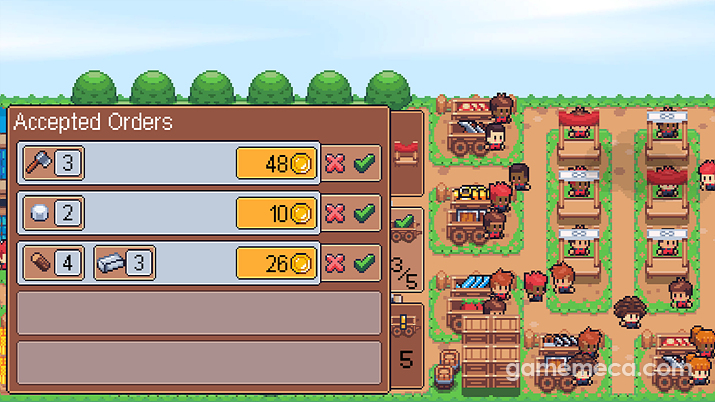
Rice Ear Village Story is a farming sim where you watch adorable characters tend to crops right on your desktop. You set up a small plot, sow seeds, and watch your farm flourish at a leisurely pace. While it might evoke memories of Rusty Retirement, this title allows you to forge your own paths, build homes, and engage in trading, offering a deeper agricultural experience.
Your job is to establish the infrastructure—fields and essential buildings—and let the game handle the rest. The characters automatically harvest crops, which you then use to expand the village with amenities like blacksmiths and research centres. It is a management sim that thrives on the intuitive joy of watching your village grow and seasons change without you lifting a finger.
▲ Rice Ear Village Story official trailer (Image Source: Night Owl Games official YouTube channel)
▲ Rice Ear Village Story screenshot (Image Source: Steam)
3. Desktop Defender
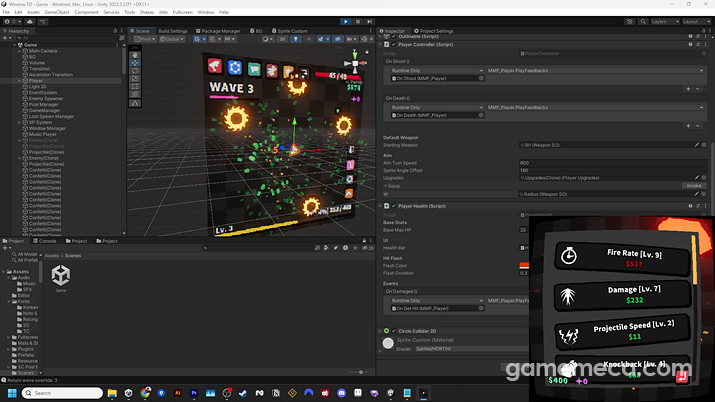
Desktop Defender blends tower defence mechanics with an auto-battler system. It’s perfect for those who want to watch their towers handle the fray while they occasionally peek at the skill tree or perform an ascension for a bit of strategic depth. With its arcade-style visuals and accessible price, it has quickly gained traction.
Every skirmish is automated, allowing you to observe your units grow stronger as they repel wave after wave. As you progress, the variety of ammunition and attack patterns keeps things fresh. You can spend your hard-earned resources to buff units or experiment with new synergies to dominate the screen. Plus, it features a transparency toggle, ensuring it doesn't get in the way of your actual work.
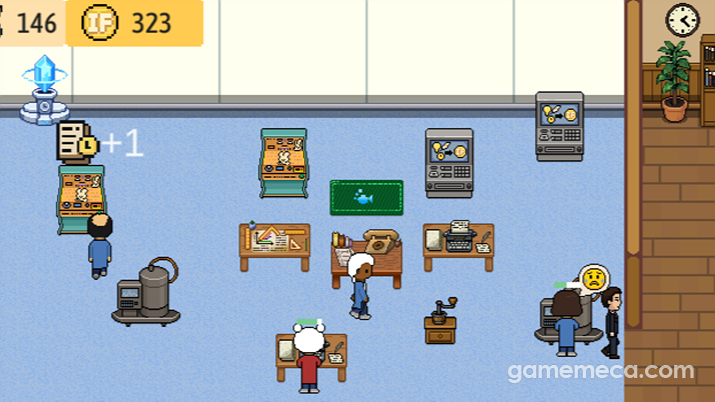
Professor Simulator is a management sim where you run a virtual university lab, mentor students, and chase academic prestige. Its unique concept has certainly piqued the curiosity of Steam users. You take on the role of a 'Professor' responsible for setting research tasks and managing the lab—and even if your methods seem a bit ruthless, they’ll surely thank you later.
Much like a real-world graduate school, the students handle their own research and writing, so you aren't bogged down in micromanagement. You just need to keep the slackers in check and provide support to ensure funding keeps rolling in. As your research milestones are met, you can upgrade your equipment and watch your humble lab transform into a powerhouse.
▲ Professor Simulator gameplay trailer (Image Source: Professor Simulator official YouTube channel)
▲ Professor Simulator screenshot (Image Source: Steam)
5. Mini Cozy Room: Lo-Fi
Mini Cozy Room is a life and schedule management sim that keeps your daily routine in check within a snug, virtual room. It boasts a 'Very Positive' rating on Steam, largely thanks to its compact mini-mode, integrated timers, and to-do list features that are surprisingly robust.
Every time you tick off a task, your room’s character or cat reacts, rewarding you with new decorations. This loop of accomplishment makes your space feel truly yours and provides a nice boost to your productivity. The ability to integrate your own audio files or YouTube playlists is a particularly clever touch that users adore.
▲ Mini Cozy Room: Lo-fi official trailer (Image Source: Tesseract Studio official YouTube channel)
▲ Mini Cozy Room screenshot (Image Source: Steam)
※ [겜ㅊㅊ]은 매주 특별한 주제에 맞춰 게이머들이 즐기기 좋은 게임을 추천하는 코너입니다.
바쁜 일상 속에서 게임을 온전히 즐길 시간을 내기란 쉽지 않습니다. 이 때문에 최근 게임을 직접 조작하지 않아도 알아서 진행되는 방치형 게임이 큰 인기를 끌고 있죠. 최근에는 여기서 더 나아가 컴퓨터 바탕화면에 띄워놓고 업무나 공부를 하며 동시에 즐길 수 있는 이른바 '데스크톱 컴패니언'이 스팀에서 새로운 태그로 신설될 만큼 주목을 받고 있습니다.
이렇게 인기를 끌고 있는 데스크톱 컴패니언 게임은 이전처럼 경영 시뮬레이션 중심이 아닌 보다 다양한 장르로 영역을 넓혀가고 있는데요. 이들 중 뚜렷한 장르나 개성을 보유해 나름의 영역을 개척한 여러 인기작을 한 자리에 모아보았습니다.
1. 코너폰드(Cornerpond)
코너 폰드는 화면 구석에 작은 연못을 만들고 나만의 생태계를 가꾸어 나가는 낚시 시뮬레이션 게임입니다. 스팀 유저 평가에서 '압도적으로 긍정적'이라는 높은 찬사를 받으며 바탕화면 힐링 게임으로 자리 잡았죠. 이용자는 잔잔한 물가에 낚싯대를 드리우고 다양한 물고기를 낚으며 평화로운 시간을 보낼 수 있습니다.
이 게임의 핵심은 업무나 다른 작업을 방해하지 않는 최소한의 인터페이스와 간결한 진행 방식입니다. 잡은 물고기를 팔아 새로운 장비를 구매하거나 연못 주변을 꾸밀 수 있어, 모니터 한쪽에서 나만의 수족관이 자라나는 듯한 만족감을 줍니다. 잔잔한 수조 소리와 함께 아늑한 아날로그 감성을 느끼고 싶어 하는 유저들에게 좋은 평가를 받고 있습니다.
▲ 코너폰드 스크린샷 (사진출처: 코너폰드 공식 트레일러 영상 갈무리)
▲ 코너폰드 공식 트레일러 (영상출처: 개발사 풀스룸 공식 유튜브 채널)
2. 벼이삭 마을 이야기: 즐거운 방치형 시간
벼이삭 마을 이야기는 바탕화면에서 아기자기한 캐릭터들이 작물을 재배하는 모습을 지켜볼 수 있는 농사 시뮬레이션 게임입니다. 플레이어는 작은 밭을 일구고 씨앗을 뿌려 농장을 번창시키는 과정을 느긋하게 감상할 수 있습니다. 러스티 리타이어먼트가 연상되지만, 마을에 난 길이나 거주지를 직접 형성할 수도 있으며 무역 및 흥정 콘텐츠를 통해 보다 심도 깊은 농사를 즐길 수 있죠.
플레이어는 마을에 밭을 만들고 다양한 주변 건물을 생성해 원활한 농업이 가능한 환경만 조성하면 됩니다. 캐릭터들이 자동으로 수확한 작물로는 마을을 발전시킬 수 있으며, 대장간이나 약제센터 등 원활한 운영에 도움이 되는 다양한 건물을 지으며 확장시킬 수 있습니다. 화면을 켜두기만 해도 계절의 변화와 작물이 자라는 모습을 직관적으로 확인할 수 있는 경영 시뮬레이터로 마을을 키우는 쏠쏠한 재미가 있다는 점이 특징입니다.
▲ 벼이삭 마을 이야기 공식 트레일러 (영상출처: 나이트 오울 게임즈 공식 유튜브 채널)
▲ 벼이삭 마을 이야기 스크린샷 (사진출처: 스팀)
3. 데스크탑 디펜더(Desktop Defender)
데스크탑 디펜더는 밀려오는 적들을 막아내는 타워 디펜스 요소에 오토 배틀러 시스템을 결합한 작품입니다. 방치해두는 동안 타워가 스스로 전투를 진행하게 만들면서, 틈틈이 스킬트리를 확인하고 승천을 진행하며 느긋한 전략의 재미를 느끼고 싶은 유저들에게 알맞은 게임이죠. 아케이드 게임풍 그래픽과 직관적인 콘텐츠, 저렴한 가격 덕에 관심을 받고 있습니다.
모든 전투는 자동으로 진행되며, 플레이어는 유저는 자동으로 적을 격퇴하며 성장하는 모습을 지켜보면 됩니다. 게임을 진행할수록 탄환의 종류와 타입, 공격방식이 달라지는 재미가 있죠. 획득한 재화로 유닛의 능력을 강화하거나 새로운 시너지를 조합해 자신만의 방식으로 화면을 가득 채울 수 있습니다. 더불어 화면을 가리지 않는 투명도 조절 기능을 지원해 시각적 방해를 최소화하는 편의 요소도 가지고 있습니다.
▲ 데스크탑 디펜더 출시일 발표 트레일러 (영상출처: 콘래디컬 게임즈 유튜브 채널)
▲ 데스크탑 디펜더 스크린샷 (사진출처: 스팀)
4. 교수 시뮬레이터(Professor Simulator)
교수 시뮬레이터는 가상의 대학 연구실을 운영하며 제자들을 육성하고 학문적 성과를 내는 경영 시뮬레이션 게임입니다. 독특한 콘셉트 덕분에 스팀에서 유저들의 호기심을 자극하며 주목을 받은 바 있죠. 플레이어는 ‘교수’가 되어 연구 과제를 설정하고 연구실을 관리해야 합니다. 비록 그 방법이 다소 악독한 것처럼 보일지라도, 자라고 나면 다 고마움을 느낄 것입니다.
화면 안의 학생들은 실제 대학원과 마찬가지로 스스로 자료를 조사하고 논문을 작성해야 하기에 플레이어가 계속해서 명령을 내릴 필요가 없습니다. 간혹 해이해진 학생들을 일깨우고, 이들의 편의를 도와주다 보면 최대한 많은 자금을 확보할 수 있습니다. 그렇게 나온 연구 성과에 따라 자금을 더 확보하고 연구실 장비를 업그레이드하다 보면 어느새 크게 성장한 나만의 연구실을 가질 수 있게 됩니다.
▲ 교수 시뮬레이터 게임 플레이 트레일러 (영상출처: 교수 시뮬레이터 공식 유튜브 채널)
▲ 교수 시뮬레이터 스크린샷 (사진출처: 스팀)
5. 미니 코지룸: Lo-Fi(Mini Cozy Room: Lo-Fi)
미니 코지룸은 아늑한 방 안의 풍경과 함께 일상 스케줄을 관리할 수 있는 일정관리 및 라이프 시뮬레이션 게임입니다. 스팀 유저 평가 '압도적으로 긍정적'에는 화면을 크게 차지하지 않는 미니 모드와 일정 관리 요소에 필수적인 타이머 및 리스트 작성 등의 콘텐츠가 알차게 들어차있기 때문입니다.
게임은 유저가 할 일을 달성할 때마다 방 안의 고양이나 캐릭터가 반응하며 방을 꾸밀 수 있는 소품을 제공합니다. 이 반복을 통해서 나만의 공간을 더욱 풍성하게 꾸미고, 친구를 초대해 공유하며 성취감을 제공해 업무 의욕을 크게 늘리죠. 특히 자신이 소장하고 있는 음성 파일이나 유튜브 재생 목록을 편하게 연동할 수 있는 편의성에 대한 호평도 큰 편입니다.
▲ 미니 코지룸: Lo-fi 공식 트레일러 (영상출처: 테서랙트 스튜디오 공식 유튜브 채널)














 GAMEMECA GLOBAL SITE