
[Arthdal Chronicles Tips] A summary of 'Settings' for convenience and efficiency
[아스달 연대기 꿀팁] 편의성·효율 챙긴 '설정' 정리

Let’s be honest: the settings menu in 'Arthdal Chronicles: Three Factions' (hereinafter 'Arthdal Chronicles') is more than just a place to tweak your resolution or audio. It is packed with quality-of-life features that can fundamentally alter how you experience the game. The team at KookminTree has done the heavy lifting to sort through these options, so if you are just stepping into this new world, take a look at these essential tweaks.
Q. I am struggling to take down the special monsters in 'Mihaje’s Hunting Festival'.
A. Head over to 'Settings - Controls - Level Adjustment' to fine-tune the difficulty.
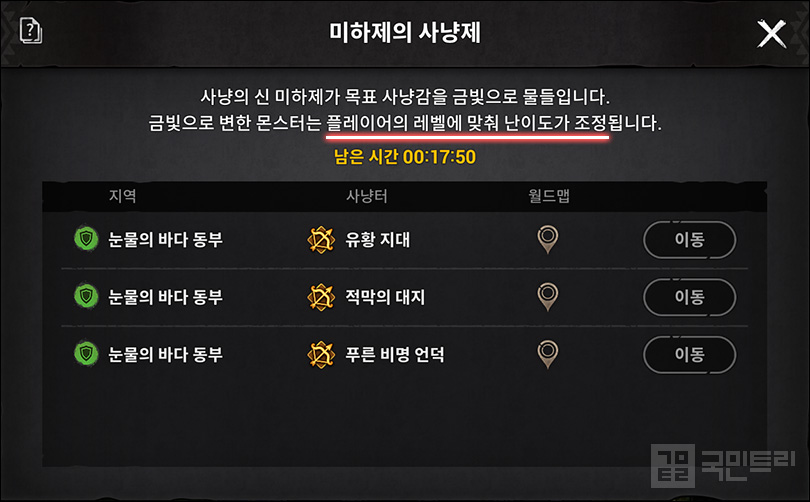
Mihaje’s Hunting Festival is a recurring event featuring elusive, golden-hued special monsters. These creatures scale according to your character’s level, regardless of the region, and drop valuable items that are often tied to the area’s specific collection requirements. It is a golden ticket for low-level players to snag high-tier loot.
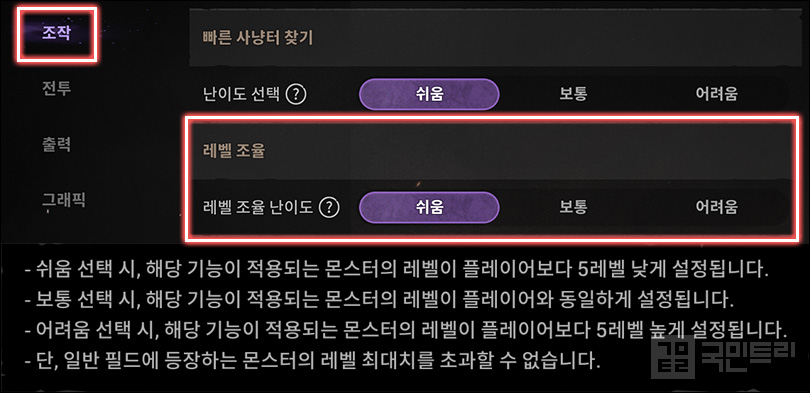
If you find these monsters a bit too feisty for your current gear, do not panic. 'Arthdal Chronicles' includes a 'Level Adjustment' feature. By navigating to 'Settings - Controls - Level Adjustment', you can toggle the difficulty. 'Easy' drops the monster level by 5, 'Normal' keeps it at your level, and 'Hard' bumps it up by 5.
Our recommendation? Dial it down. The goal is to wipe out these monsters in a single rotation of your main skills. Test the 'Hard' setting first, and if you are not clearing them efficiently, drop the level down one step at a time. It is far more profitable to clear as many monsters as possible within the time limit than to struggle against higher-level foes for a marginally higher experience gain.
Q. I keep accidentally switching to my 'Sub-Job' while I am in the middle of a fight.
A. Disable the 'Job Change' button and remap your hotkeys.
We have all been there—you are mid-content, and suddenly your character switches to a sub-job you haven’t geared or specced. It is a frustrating dip in power. The best move is to hide the button so you don’t fat-finger it during a heated encounter.
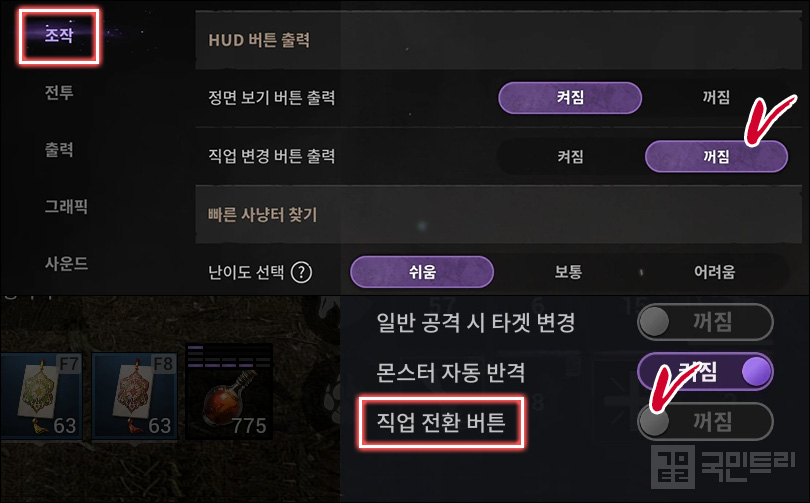
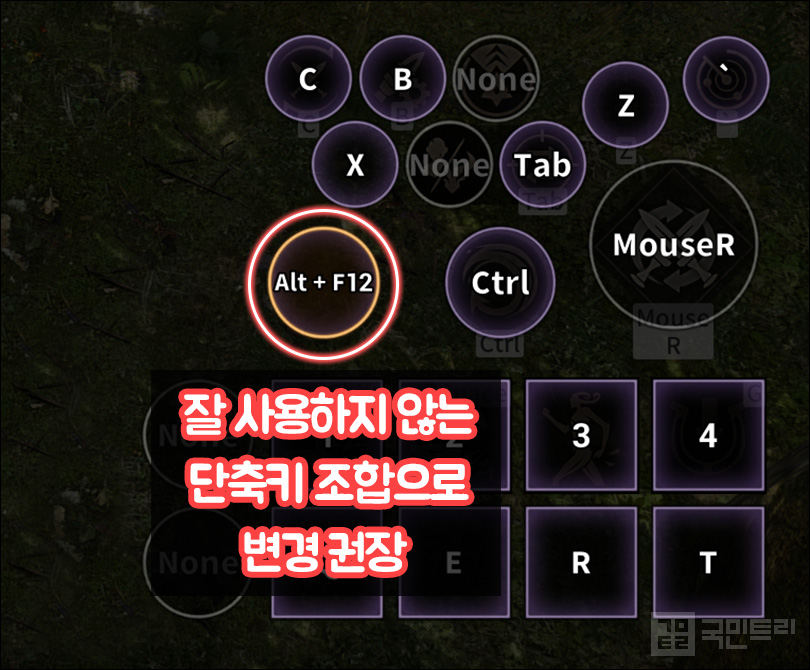
You can toggle the button visibility under 'Controls - HUD Button Display - Job Change Button Display'. Alternatively, check the bottom of the 'Combat Quick Settings' menu. Even then, the default hotkey 'V' might still trigger a switch. Go to the 'Key Bindings' menu in the game settings and reassign 'V' to something else or leave it blank to ensure you stay in your primary role.
Q. Are there any settings to improve my grinding efficiency?
A. Yes, check your 'Targeting, Skill Controls, and Cutscene Skipping' settings.
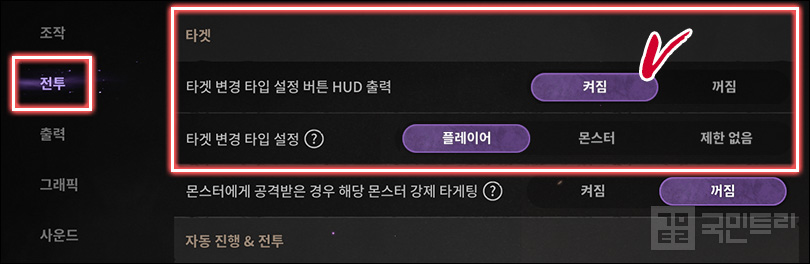
Whether you are deep in PvE or brawling in PvP, 'Arthdal Chronicles' requires you to keep track of your targets. Things get messy when monsters and players occupy the same space. To manage this, enable the 'Target Type HUD' button.
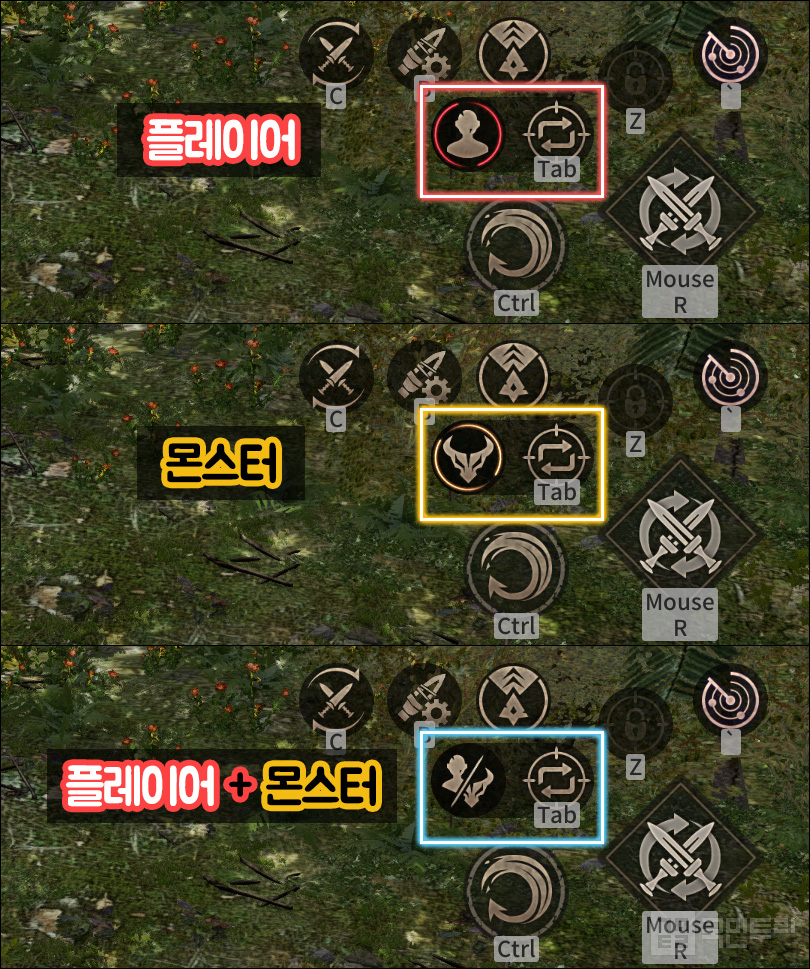
This adds a handy toggle next to your targeting button, letting you cycle between 'Player', 'Monster', or 'Both'. If you are trying to avoid drama while farming near a boss, setting your target to 'Monster' is a lifesaver.
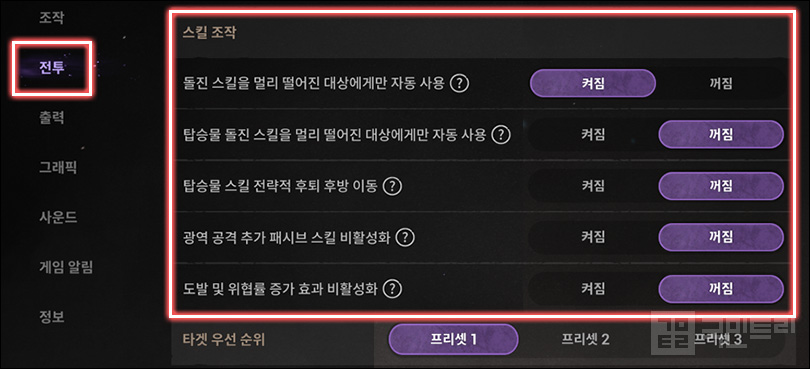
Next, let’s talk skills. By following the recommended settings, your dash skills will only trigger on targets at least 4m away. Additionally, skills like 'Strategic Retreat' or an Archer’s 'Continuous Fire' will stop forcing your character to move backward. This prevents you from wasting time repositioning during a grind, significantly boosting your kill efficiency.
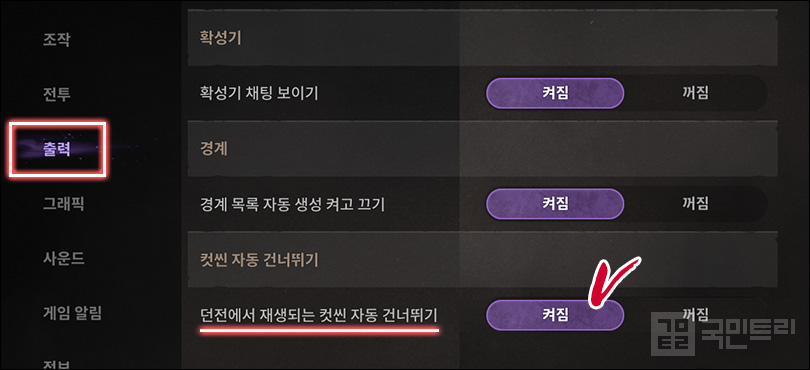
Finally, do yourself a favour and enable 'Display - Auto-skip Cutscenes'. When running party dungeons, these cutscenes are a major time sink. If your party members have to manually skip them, it becomes a chore. Enabling this automatically skips them, ensuring you don’t become the person holding up the group. Just remember, you need to toggle this for each character individually, so prepare for a bit of repetitive clicking.
'아스달 연대기: 세 개의 세력(이하 아스달 연대기)' 게임 내 설정은 유저에게 다양한 편의 기능을 제공한다. 캐릭터 움직임을 조정하는 조작 영역부터 그래픽, 사운드, 각종 알림 설정까지 각종 옵션을 지원한다. 상세히 들여다보면 단순 설정 외에도 콘텐츠에 영향을 주는 요소도 제법 있다. 이에 국민트리가 게임 플레이에 도움 되는 편의 설정을 조사해 본문에 정리했다. 이번 뉴 월드로 아스달 연대기를 처음 시작했다면 도움 될만한 편의 설정이 많으니 꼭 살펴보자.
Q. '미하제의 사냥제' 특수 몬스터 사냥이 어려워요.
A. '설정 - 조작 - 레벨 조율'에서 난도를 조정하세요.
미하제의 사냥제는 일정 시간 동안 금빛 외형의 특수 몬스터가 등장하는 주기 이벤트다. 특수 몬스터 레벨은 출현 지역과 상관없이 사냥하는 캐릭터 레벨에 비례하며, 사냥 시 지역에 맞는 필경관 아이템을 보상으로 제공한다. 더불어 해당 지역에 등장하는 몬스터와 같은 보상을 제공해 레벨이 낮을 때는 더 좋은 아이템을 노릴 수 있는 기회로 삼을 수 있다.
여기서 문제는 특수 몬스터를 잡는 것이 벅찬 경우다. 이에 아스달 연대기는 '레벨 조율' 기능을 따로 마련했다. '설정 - 조작 - 레벨 조율'에서 특수 몬스터 난도 조정이 가능하다. 쉬움 선택 시 본인 레벨보다 5레벨 낮아지고, 보통은 동일 레벨, 어려움을 선택하면 5레벨 높게 설정된다.
권장하는 세팅은 하향 조정이다. 그렇다고 무작정 내리는 것이 아니라 특수 몬스터를 주력 스킬 한 방에 쓰러트릴 수 있는 수준으로 설정하는 것이다. 처음엔 어려움으로 설정해서 테스트해 보고, 스킬 한 번에 처리가 안 된다면 단계를 하나씩 낮추는 방법이다. 난도를 높여 획득 경험치를 높이는 것도 중요하지만, 제한 시간 안에 가능한 많은 몬스터를 처치해 전리품을 최대한 챙기는 것이 더 이득이다.
Q. 세팅이 아직 덜 됐는데, 의도치 않게 '부직업'으로 바뀝니다.
A. '직업 변경 버튼'을 끄고, 단축키를 변경하세요.
콘텐츠를 즐기던 도중 갑자기 부직업으로 바뀌어 당황한 경험이 한 번쯤 있을 것이다. 보통 부직업 장비나 스킬은 준비하지 않기에 의도치 않게 부직업으로 변경하면 훨씬 약한 상태가 된다. 그래서 육성 초반에 실수로 터치·클릭하지 않도록 버튼을 꺼두는 것이 마음 편하다.
부직업 변경 버튼은 '조작 - HUD 버튼 출력 - 직업 변경 버튼 출력'에서 켜고 끌 수 있다. 또는 '전투 간편 설정' 최하단에 '직업 전환 버튼'을 끄는 것으로도 해결할 수 있다. 하지만, 기본 단축키 'V'를 누르면 여전히 부직업 변경이 가능한데, 이는 게임 내 메뉴 '단축키'로 들어가 변경이 가능하다. 다른 버튼을 V로 할당하면 부직업 변경 버튼이 'None(미 할당)' 상태가 된다. 만약 추후 부직업 사용을 염두에 둔다면 잘 사용하지 않는 단축키 조합으로 임시 변경해도 좋다.
Q. 사냥이나 콘텐츠 효율을 늘릴 수 있는 설정도 있나요?
A. '타겟 변경·스킬 조작·컷씬 건너뛰기' 설정을 확인하세요.
아스달 연대기는 PvE·PvP 분야를 넘나들며 콘텐츠를 즐긴다. 어떤 것을 하느냐에 따라 주력 타겟이 몬스터가 되거나, 상대 플레이어가 되기도 한다. 문제는 필드에서 둘이 섞일 때다. 이때 특정 타겟만 정하고 싶다면 '타겟 변경 타입 설정 버튼 HUD'를 이용하자.
해당 옵션을 타겟 변경 버튼 옆에 타입 설정 토글이 생긴다. 누를 때마다 '플레이어 - 몬스터 - 플레이어·몬스터'로 설정이 바뀐다. 만약, 보스 몬스터가 얽혀있는 상황에서 분쟁을 만들기 싫다면 몬스터로 설정해 콘텐츠에 참여하면 편하다.
다음은 스킬 조작 설정이다. 상기 예시만 따라 하면 돌진 스킬은 4m 이상 떨어진 대상에게만 사용한다. 더불어 탑승물 스킬 전략적 후퇴, 궁수 연속 사격, 후퇴 반격 사용 시 후방으로 이동하지 않는다. 사냥 시 가까운 대상에게 돌진을 사용하거나 후퇴 공격으로 뒤로 이동하면 그만큼 사냥 효율이 떨어지므로 꼭 설정하자.
추가로 꼭 확인이 필요한 설정이 있다. 다른 유저들과 파티 던전 공략 시 특정 분기마다 컷씬이 나온다. 모든 파티원이 스킵 해야만 빠른 진행이 가능한데, 나올 때마다 매번 스킵 버튼을 누르기 상당히 번거롭다. 이럴 땐 '출력 - 컷씬 자동 건너뛰기'를 확인하자. 옵션을 켜면 모든 파티 던전 컷씬을 자동으로 스킵 할 수 있다. 종종 스킵을 잊어서 반복 공략이 늦어지거나, 늦게 누르는 것이 민폐가 될 수 있으니 반드시 켜는 것을 권한다. 참고로 해당 설정은 캐릭터마다 모두 설정해야 하므로 많은 캐릭터를 키우는 유저라면 번거롭더라도 모두 조정하자.


- Which Team is the Strongest This Year? LCK 2026 Finals to Be Held on the 12th and 13th
- Already the third time, Overwatch x LE SSERAFIM detailed look revealed
- Unity Launches Official Plugin for 'Claude Code'
- XLGAMES Decides to Sell ArcheAge IP for 39.2 Billion Won
- Lim Yo-hwan vs Kang Min Match, SOOP Official Live Broadcast for BlizzCon 2026
- Popup events to be held in Dongdaemun and Yongsan to celebrate the release of Liftbound
- [Today's steam] FPS Wardogs released... 340,000 Concurrent Players, 340,000 in queue
- Doomfist's Companion, Overwatch Vampire New Hero 'Doctrine'
- GTA 6 Online to support up to 32 players, confirmed through lawsuit documents
- Marvel Rivals Welcomes 'Gorr the God Butcher' on the 11th