
'Kiting made easier' League of Legends WASD movement test begins
'카이팅 쉬워졌다' 롤 WASD 이동 테스트 시작
2025.08.28 15:21 UTC+9
AI Summary
League of Legends introduces WASD movement to the PBE server. The update includes a new Dynamic Camera to aid visibility. Players can test these changes now before the official launch.

The long-teased WASD movement scheme for League of Legends (LoL) has finally arrived on the Public Beta Environment (PBE) servers.
Riot Games first hinted at this shift in a developer note back on August 11. By allowing players to navigate via the W, A, S, and D keys rather than relying solely on mouse clicks, the developer hopes to lower the barrier to entry for newcomers and returning players alike.
You can now put these controls to the test on the PBE. To enable the feature, simply open the system menu and toggle the 'WASD Keybinds' option on the left. Activating this changes your key mapping: Q abilities move to Left-Click, W to Left-Shift, E to Q, and R to E. Summoner spells are relocated to the Space bar and F, though every key remains fully remappable to your preference.
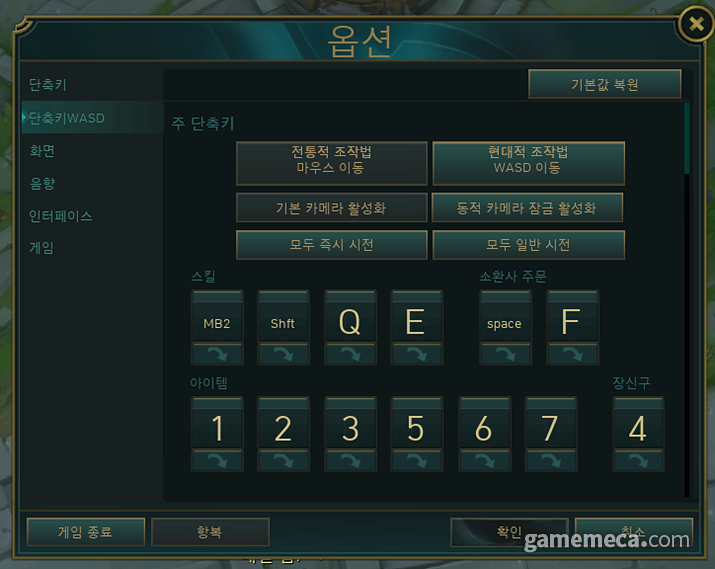
To complement the new control scheme, a 'Dynamic Camera' feature has been introduced. When active, the camera adjusts so your character remains within view even if you push your mouse to the edge of the screen—a handy tool to ensure you never lose track of yourself during chaotic ability exchanges.
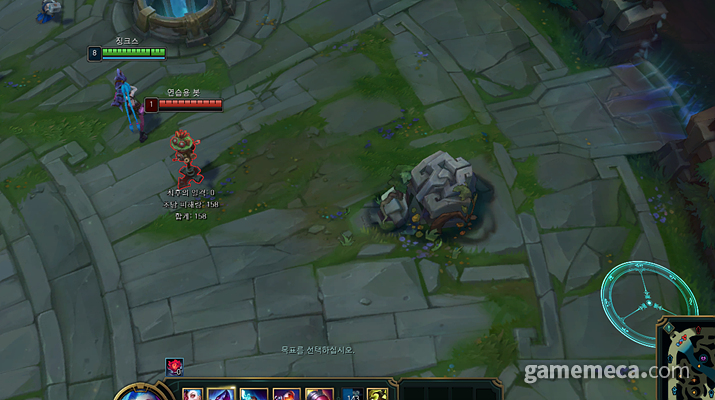
Initial feedback from players testing the WASD setup has been largely positive. Many note that it makes 'kiting'—the art of attacking while maintaining distance—feel much more intuitive for ranged champions. That said, some members of the community have expressed concerns regarding potential balance disparities between mouse-only and WASD control styles.
Riot Games has yet to announce a firm date for the full release. However, given that PBE updates typically transition to live servers within one to two weeks, you should hopefully be able to try it out in the main game fairly soon.
한 차례 예고됐던 리그 오브 레전드(이하 롤) WASD 조작이 공개 테스트(PBE) 서버에 적용됐다.
라이엇게임즈는 지난 8월 11일, 개발자 노트를 통해 WASD 조작 도입을 예고한 바 있다. WASD 조작법은 기존 마우스 클릭이 아니라 키보드의 W, A, S, D로 이동하는 방식이다. 롤을 처음 하거나 복귀 유저가 조금 더 쉽게 게임에 적응할 수 있도록 도울 것으로 기대된다.
그리고 이번에 공개 테스트 서버에서 WASD 컨트롤을 시험해볼 수 있다. WASD 조작법을 사용하려면 시스템 창을 켠 뒤, 좌측 ‘단축키 WASD’ 메뉴에서 활성화하면 된다. 해당 기능을 켜면 기존 Q스킬은 좌클릭, W스킬은 좌측 쉬프트, E스킬은 Q, R스킬은 E로 사용 키가 전환된다. 소환사 주문은 각각 스페이스 바와 F로 바뀌며, 모든 버튼은 다른 버튼으로 교체 가능하다.
새로운 컨트롤 도입에 맞춰 ‘동적 카메라’ 기능도 새로 생겼다. 동적 카메라를 활성화하면 마우스를 화면 가장자리에 가져가도, 캐릭터가 화면을 벗어나지 않는 선에서 시점이 움직인다. 스킬 사용 중 자신의 캐릭터 위치를 놓치는 현상을 방지하기 위함이다.
WASD 조작을 체험해본 유저들은 전반적으로 긍정적인 반응을 보였다. 특히 원거리 캐릭터가 거리를 조절하며 공격을 이어가는 ‘카이팅’을 하기 수월해졌다는 평이다. 다만 일각에서는 “마우스와 WASD 조작 간의 밸런스가 우려된다”는 지적도 있다.
이번에 테스트 중인 WASD 조작이 본 서버에 적용되는 시점은 아직 공개되지 않았다. 그 동안 PBE 서버에 적용된 업데이트는 일반적으로 1~2주 뒤 본 서버에 적용됐다는 점을 감안하면, 가까운 시일 내에 본 서버에서도 해볼 수 있을 것으로 보인다.
This news was translated by AI.

I will greet you with a good article. niro201@gamemeca.com
READ MORE
-
 [Hidden Gems] Murder mystery game set in a locked room receives 'Overwhelmingly Positive' reviews, The Mermaid Mask
-
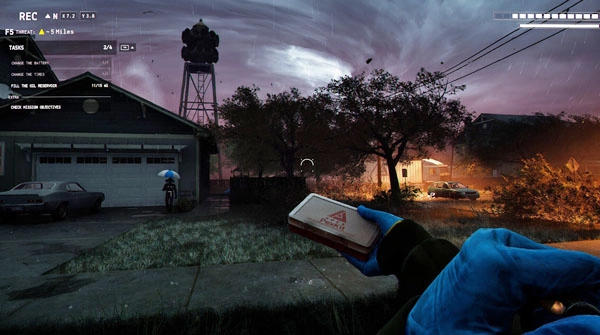 [Today's Steam] Funnel Runners, a Lethal-like game with a tornado twist, gains attention
-
 ONE Store Launches 'One Play' Service with RPG 'Gladiator Raising'
-
 Treasure Hunting in the Deep Sea, Path of Exile New League Starts on the 25th
RECOMMENDED NEWS
MOST POPULAR NEWS
- Catch! Teenieping Arrives in KartRider Rush+ Collaboration
- Dplus KIA Admits Salary Delays, Confirms Club Sale in Progress
- Deciding the Path to Champions, VCT Pacific Stage 2 Opening Announced
- Shoulder to shoulder with Ronaldo, Faker named Esports World Cup ambassador
- Adventure with Cute Summons, New MMO 'Dream Traveler: Starlight Journey' Released
- 2026, 'Monster Taming RPG' Emerges as a New Open-World Trend
- Outerplane Summer Massive Update Includes New Character
- Nexon Foundation, Supercell, and Smilegate Participate in the 2026 Youth eSports Festival
- Learn card games at the station, 'Pokémon Mega Festa' kicks off in Busan
- League of Legends to Host Wild Fan Fest at Hyundai Department Store in Yeouido and Pangyo
MEDIA PARTNERSHIPS


GAMEMECA SNS